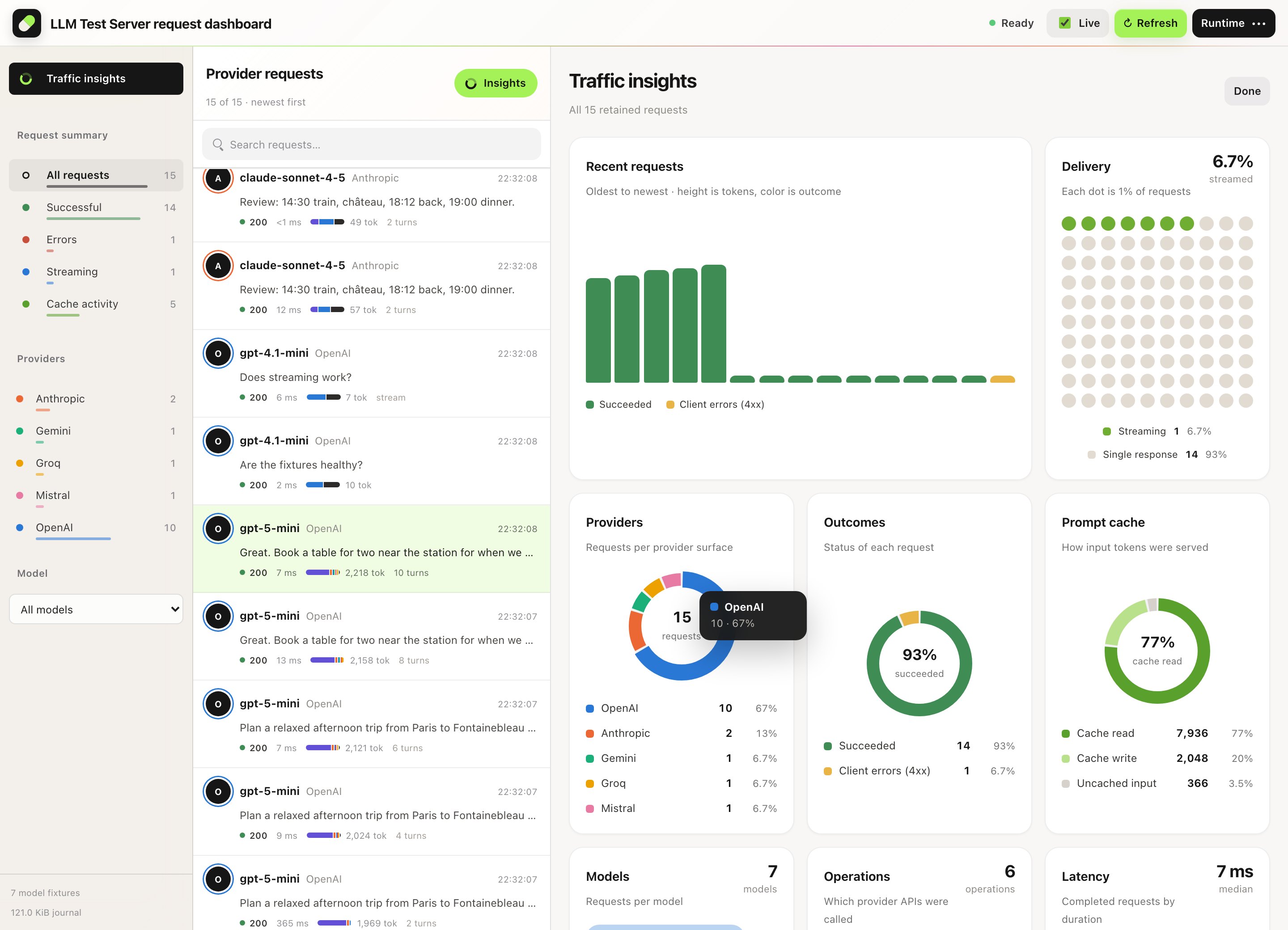
Traffic insights
All traffic at a glance.
Providers, models, outcomes, latency, cache and context mix as charts. Click a slice to filter the request inbox.
.NET-native · Docker for any stack
A deterministic LLM API server for your tests — in .NET, Python, Node, Go or any language that speaks HTTP.
Script responses, streaming, tool calls and failures. Call it with your regular provider SDK, then see exactly what your application sent and where every token went.
dotnet add package ManagedCode.LlmTestServer.Aspire
docker run -p 8080:8080 ghcr.io/managedcode/llm-test-server:1.0.0
13 provider API families, each under its own local namespace
How it works
Keep your real provider integration in the test. Choose the behavior on the other side.
Script a model, a reply, a tool call or a failure.
.UseChatScenario("greeting", s => s
  .ForModel("gpt-6.1-sol")
        .WhenUserContains("hello")
.Responds("Hello from your test!"))Point your provider SDK or IChatClient at the namespaced route.
POST /openai/v1/chat/completions
→ 200 OK
→ "Hello from your test!"Assert on the reply and the recorded requests.
var state = await control
  .GetAssertionsAsync();
// state.Matched == 1
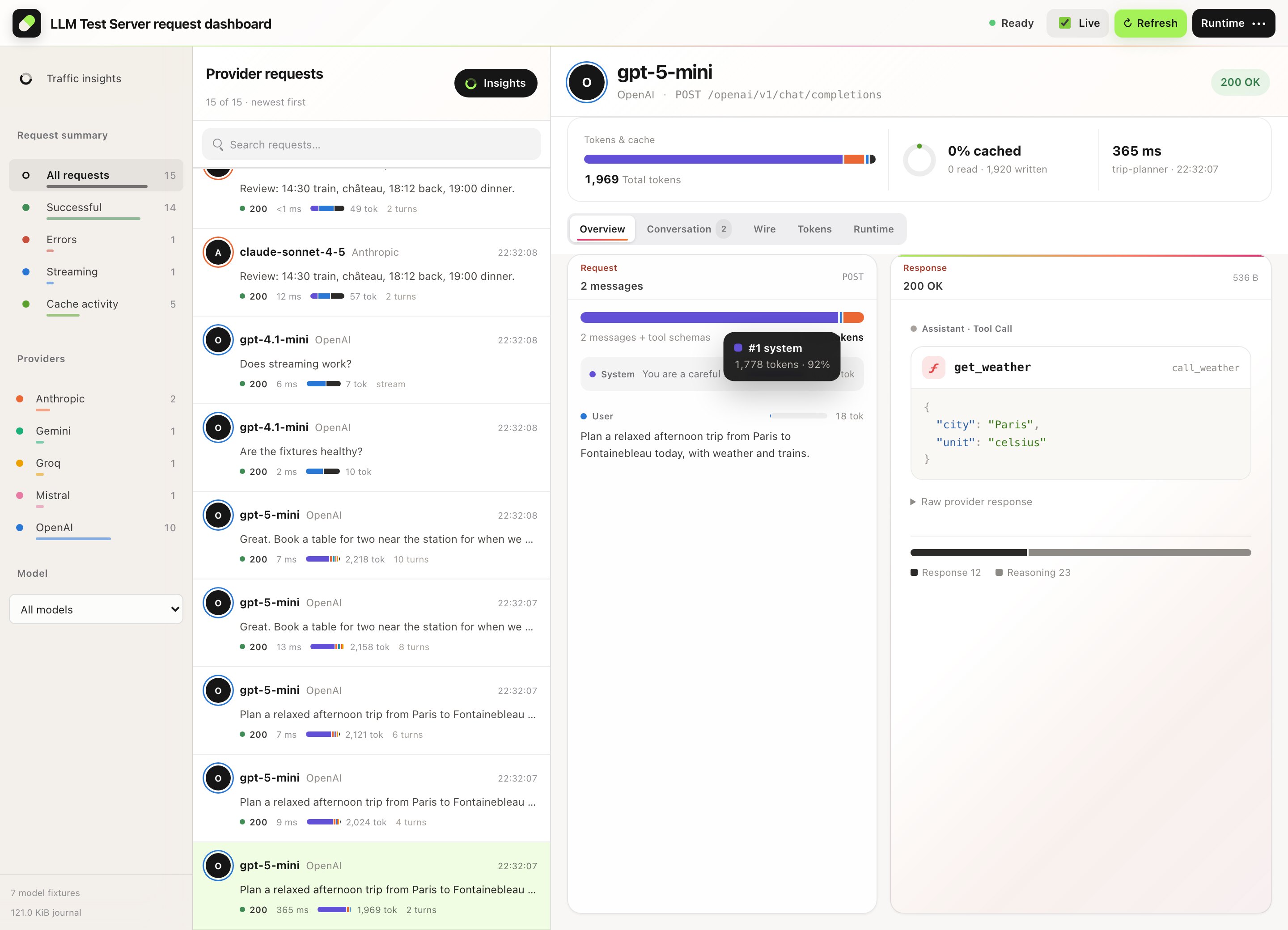
The built-in request dashboard
Provider, model, status, latency and token usage stay with each request. Select a call to read the response, the conversation behind it and the wire payloads. Hover any chart for exact values; JSON payloads and tool-call arguments are highlighted.
Traffic insights
Providers, models, outcomes, latency, cache and context mix as charts. Click a slice to filter the request inbox.
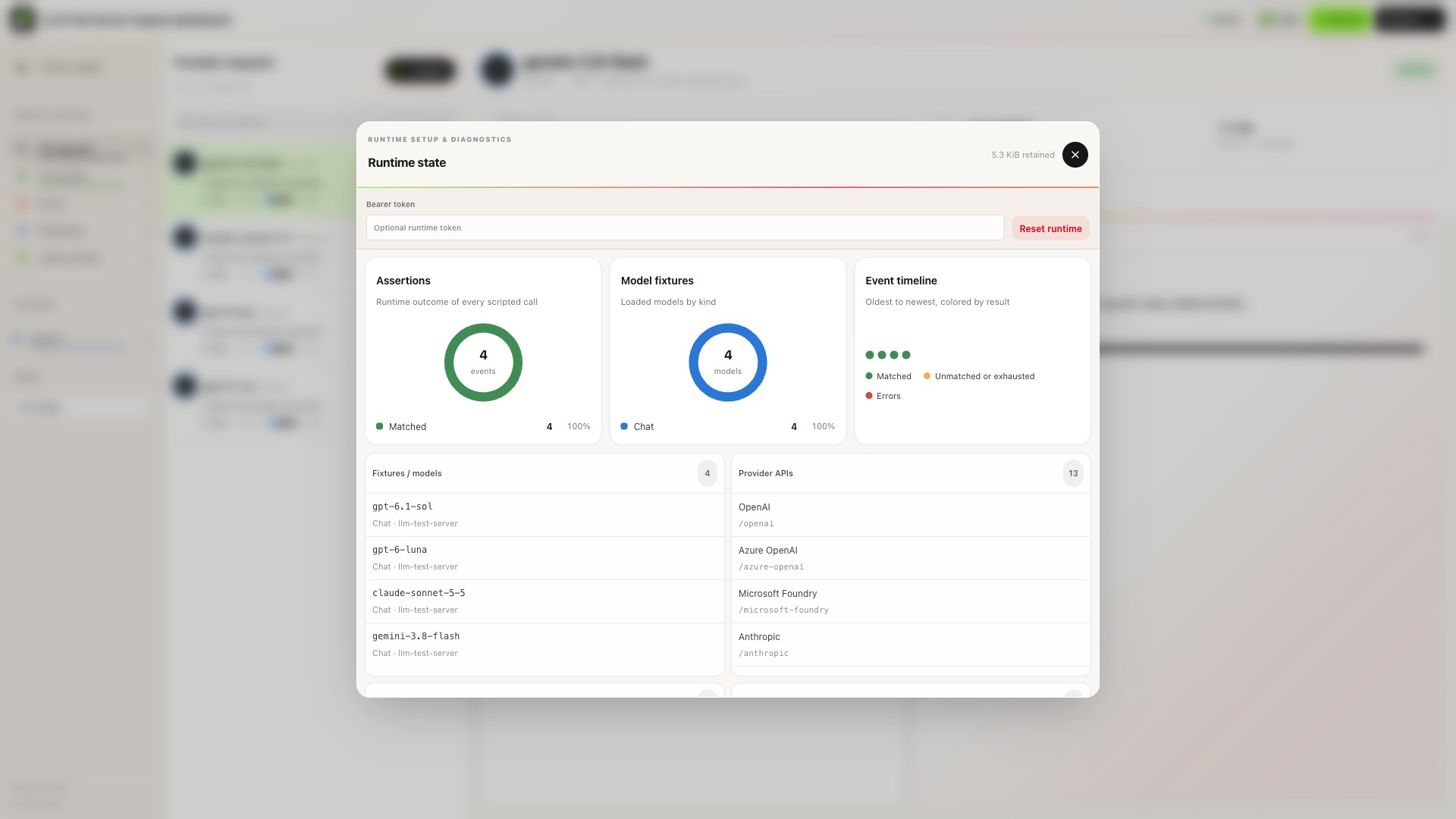
Runtime diagnostics
Inspect models, fixtures, provider endpoints, assertions and runtime events from the same debugging surface.
Request lifecycle
Your test calls through its usual client. The server answers from your fixtures and records the exchange for the dashboard and your assertions.
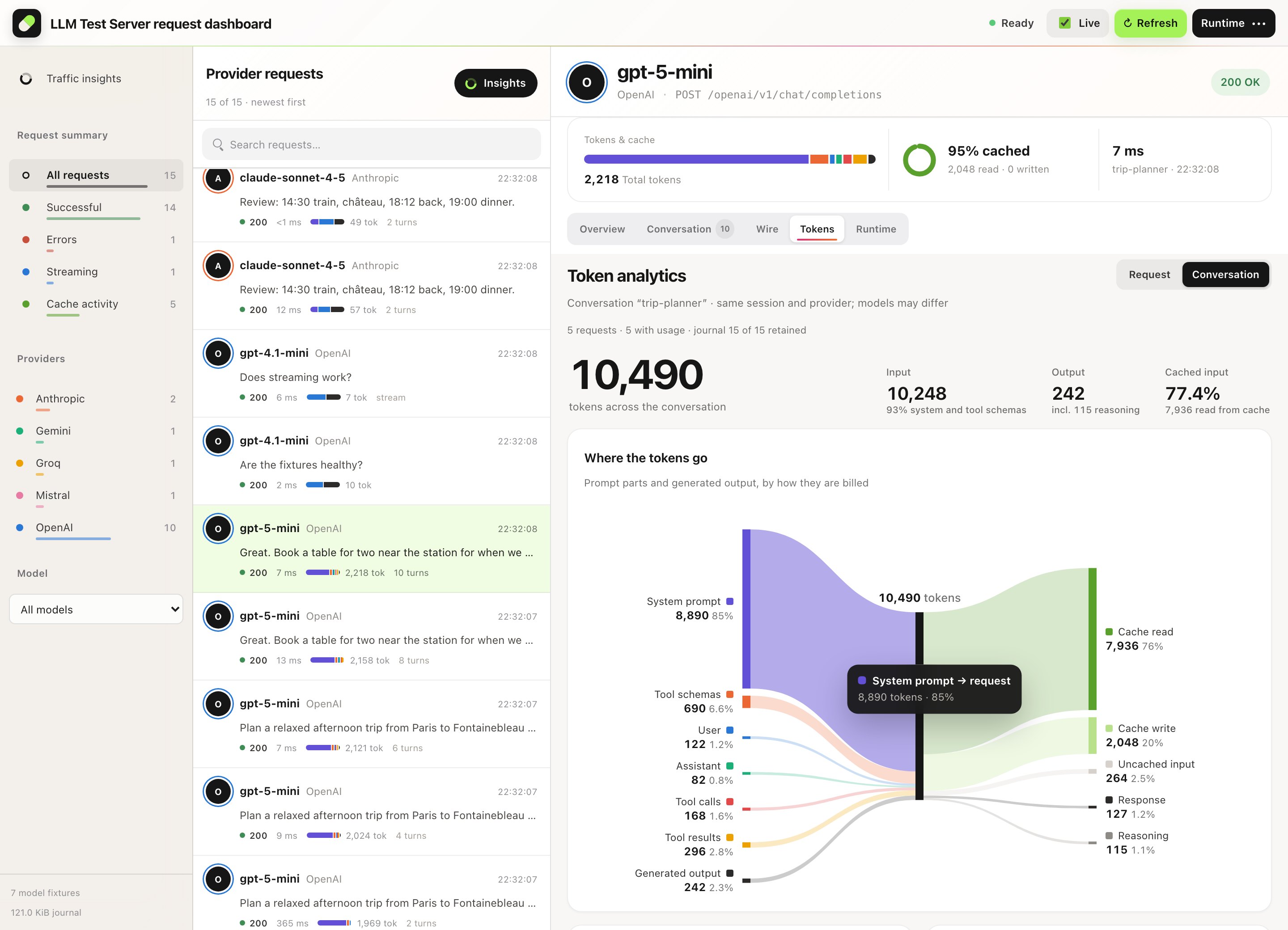
Token analytics
The Tokens tab splits each request's input by source: system prompt, tool schemas, user, assistant, tool calls and tool results. The parts add up to the reported input. Then it shows what the prompt cache read, what it wrote and what stayed fresh.
Your tests read the same numbers from GET /admin-api/requests: each request's usage
carries the per-role split as InputComposition.
Where 3,140 input tokens came from, and how the prompt cache handled them. Example request.
What the prompt is made of.
How the input was served.
Input per request in one labeled conversation.
Output55 tokens
Example values. Reasoning is part of output and cache reads/writes are part of input, so they are never added twice. Requests without reported usage show as missing, not as zero.
The same journal, sliced by provider, model, outcome, latency, operation and delivery. Open it with
/?view=insights; clicking a slice filters the request inbox.
Requests per provider surface.
One dot per request.
Share of requests that returned 2xx.
Requests per latency band.
Routed provider operations.
chat.completions.create44%messages.create23%models.generateContent15%responses.create10%embeddings.create8.3%Streamed chunks or one body.
Beyond a single reply
Every behavior is a fixture you choose. Nothing is hidden behind retries or randomness.
Conversation graphs match each call and result, then choose the next reply.
Conversation DSLScript exact chunks: one response id, then the terminal marker.
Streaming chunksRate limits and content filters on every provider family.
Fault simulationExplicit embeddings, images, audio and video jobs where supported.
ModalitiesEach session owns its configuration, queue and journal.
Test sessionsCheck order, counts and tool arguments; fix ids with a seed.
VerificationProvider-aware, by design
Every provider family has its own namespace and wire format. Operation coverage varies by provider and grows incrementally.
Read the operation matrix/openai/v1Official SDK checked/azure-openai/openai/deployments/…Official SDK checked
/microsoft-foundry/modelsOfficial SDK checked
/anthropic/v1/messages/gemini/v1beta/models/…/bedrock/model/…/converseOfficial SDK checked
/groq/openai/v1/mistral/v1/ollama/api/chat/cohere/v2/chat/openrouter/api/v1/deepseek/v1/perplexity/v1/sonar/systemone · /cloudflareTypeSafe Jev · Workers AI Clef
Each hosted operation is listed in a provider contract with documentation links and behavior tests. A provider profile does not imply every API of that provider is implemented: check the operation and client version your application uses.
Get started
On .NET, add it to your Aspire AppHost. Everywhere else, run the Docker image and point your provider SDK at it.
Aspire starts the packaged .NET server and allocates its endpoint. No container runtime needed.
dotnet add package ManagedCode.LlmTestServer.Aspire
dotnet add package ManagedCode.LlmTestServer.Clientusing ManagedCode.LlmTestServer.Aspire;
var builder = DistributedApplication.CreateBuilder(args);
builder.AddLlmTestServer("llm").WithApiKey("test-key");
builder.Build().Run();var control = new LlmTestServerClient(
app.CreateHttpClient("llm", "http"), "test-key");
await control.ConfigureAsync(config => config
.RequireBearerToken("test-key").UseModel("gpt-6.1-sol", LlmTestServerModelKind.Chat)
.UseChatScenario("greeting", scenario => scenario
.ForModel("gpt-6.1-sol")
.WhenUserContains("hello").Responds("Hello from your test!")));
using var chat = control.CreateChatClient("gpt-6.1-sol");
var reply = await chat.GetResponseAsync(
[new ChatMessage(ChatRole.User, "hello")]);
// reply.Text == "Hello from your test!"
Python, Node, Go, Java or anything else: the image serves the same provider routes, dashboard and
/admin-api. Load fixtures with one request.
docker run --rm -p 8080:8080 \
  -e LlmTestServer__RequiredBearerToken=local-test-key \
ghcr.io/managedcode/llm-test-server:1.0.0curl http://localhost:8080/admin-api/configure \
-H 'Authorization: Bearer local-test-key' \
-H 'Content-Type: application/json' \
--data '{"requiredBearerToken":"local-test-key",
"models":[{"id":"gpt-6.1-sol","kind":"chat"}],
"chatScenarios":[{"id":"greeting","modelId":"gpt-6.1-sol",
"responses":[{"content":"Hello from LLM Test Server"}]}]}'from openai import OpenAI
client = OpenAI(base_url="http://localhost:8080/openai/v1",
api_key="local-test-key")
reply = client.chat.completions.create(
model="gpt-6.1-sol",
messages=[{"role": "user", "content": "Hi"}])
assert reply.choices[0].message.content == "Hello from LLM Test Server"A few useful details
No. The server returns the fixtures configured for your test. It models API behavior so your application can make real HTTP or SDK calls against a local server.
No. The Docker image serves the same provider routes, dashboard and management API to any language. Point your Python, Node, Go or Java provider SDK at the container and configure fixtures over HTTP.
Not on .NET. The package-owned Aspire integration starts the packaged .NET server and exposes its allocated resource endpoint. For other stacks, the container image is the way in.
Use the supported routes with the SDKs listed in the operation coverage documentation. Compatibility is verified per operation; check your client version and API requirements.
Usage is deterministic. Text is counted with a tiktoken-compatible tokenizer, so the same request always reports the same input, output, reasoning and cache values. It does not reproduce a provider's billing.
Yes. Create separate test sessions for independent configuration, scenario queues, history and diagnostics. Dispose each session when its test ends.
No. Coverage varies by provider. The operation matrix describes the claimed routes, streaming modes and SDK evidence. Provider profiles grow incrementally.
No. It verifies your application's behavior against scripted API fixtures. It does not measure the quality of a live model's answers.

Make the next call predictable
Start the server, script a response and inspect your first request.